
Watch full repair video ipad pro a2377 not charging repair PD Controller CD3217B12
iPad Pro Not Charging? Multiple Faults Found! Full Repair & Diagnosis | AppleFix NZ
iPad Pro Not Charging? Multiple Faults Found! Watch the Complete Repair & Diagnosis
If your iPad Pro is not charging — or worse, it still won’t charge after a previous repair — you’re not alone. This is one of the most common (and most misdiagnosed) faults we see at AppleFix NZ. In this case study, we walk through the real repair of an iPad Pro 11-inch 3rd Generation (model A2377) that arrived from another city already “fixed” by a different technician, but still refusing to charge.
What we found underneath tells you everything about why a charging port replacement alone often isn’t enough.
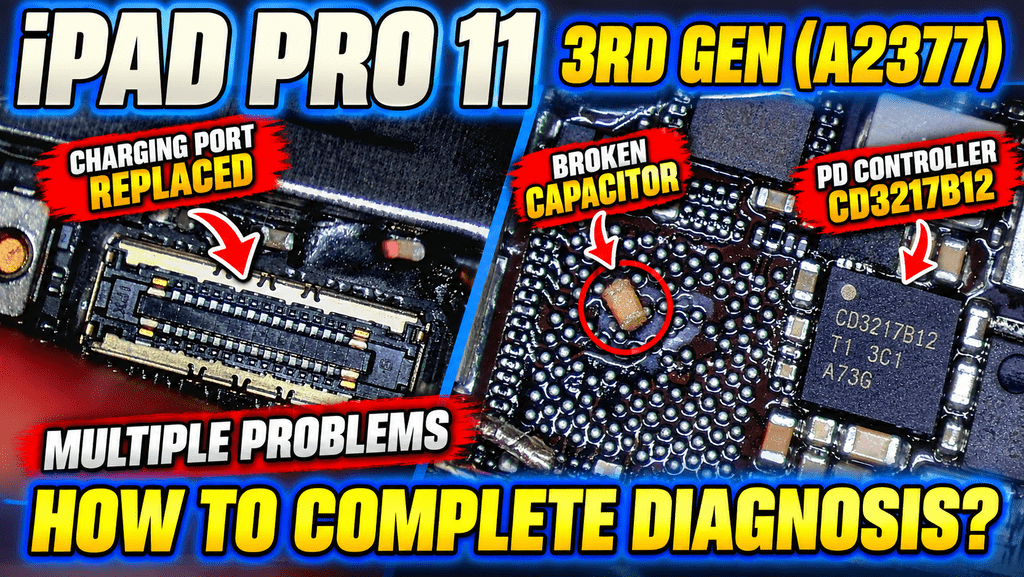
The Problem: iPad Pro Still Not Charging After Port Replacement
This iPad had already been through one repair attempt. The previous technician had replaced the charging port — the first, most obvious suspect when an iPad won’t charge. But the problem persisted. The device arrived at our Hamilton workshop with the same complaint: no charging, no power, no response to a charger being plugged in.
This is a pattern we see constantly, and it’s exactly why people search for things like:
- “iPad Pro not charging after charging port replacement”
- “why is my iPad still not charging after repair”
- “iPad Pro charging port replaced but still not working”
- “iPad Pro not detecting charger”
The short answer: a charging port replacement only fixes a charging port problem. If the fault sits deeper on the logic board, replacing the port won’t touch it — and that’s exactly what had happened here.
Step One: Finding the Damaged Capacitor
During our inspection of the charging circuit, we discovered that an important capacitor near the charging circuit had been damaged during the previous repair. This is a common risk with component-level work — a slip of the soldering iron or excess heat during a port swap can easily crack or lift a tiny capacitor nearby.
We replaced the damaged capacitor. Logically, this should have solved the problem.
It didn’t. The iPad Pro still refused to charge.
Why “Replace and Hope” Doesn’t Work on Logic Board Repairs
This is the point where many repairs go wrong — either the device gets sent back as “unrepairable,” or a technician starts swapping parts one by one without actually confirming the root cause. At AppleFix, we don’t guess. When a second fault clearly exists, the only way forward is proper motherboard and charging circuit diagnostics.
Step Two: Diagnosing the Real Fault — the CD3217B12 PD Controller
Rather than continuing to swap components blind, we carried out detailed diagnostics across the charging and USB-C power delivery circuit. This testing pointed to the true source of the problem: a faulty USB-C Power Delivery (PD) controller — the CD3217B12 chip.
This tiny IC manages how power is negotiated and delivered between the charger and the iPad’s battery and power management system. When it fails, symptoms often look identical to a bad charging port or a dead battery — which is exactly why so many charging faults get misdiagnosed.
What Is a PD Controller and Why Does It Cause Charging Faults?
The PD (Power Delivery) controller is responsible for “talking” to your charger and telling the device how much power to accept. If this chip is damaged — from a power surge, liquid exposure, or a previous repair attempt — the iPad may:
- Not detect the charger at all
- Charge intermittently or not hold a charge
- Show no response even with a known-good cable and charger
- Pass a port replacement test but still fail to charge
The Repair: Component-Level Microsoldering
Once the CD3217B12 PD controller was confirmed as the fault, it was removed and replaced using advanced component-level microsoldering techniques. This type of repair requires precision equipment, board-view schematics, and experience working at the chip level of an iPad’s logic board — it’s not a repair most standard shops are equipped to carry out.
After the new PD controller was installed, the iPad Pro powered on, detected the charger immediately, and began charging normally.
Result: iPad Pro Charging Problem Fully Resolved
What started as a simple “won’t charge” complaint turned out to involve three separate issues layered on top of each other:
- A charging port that had already been replaced (but wasn’t the actual cause)
- A damaged capacitor caused during the earlier repair attempt
- A faulty CD3217B12 USB-C power delivery controller — the true root cause
Only by working through each layer with proper diagnostics — rather than guessing — was the device brought back to full working condition.
Common iPad Pro Charging Problems (And How People Search for Them)
Whether you’re typing into Google or asking an AI assistant like ChatGPT, most people describe this fault in very similar ways. If any of these sound familiar, this repair is relevant to you:
- iPad Pro not charging
- iPad Pro charging port not working
- iPad Pro USB-C not working / USB-C charging problem
- iPad Pro not detecting charger
- iPad Pro won’t charge even when plugged in
- iPad Pro charging problem after port replacement
- iPad Pro charges intermittently
- iPad Pro battery not charging
- iPad Pro charging circuit repair
- iPad Pro PD controller repair
- iPad Pro motherboard / logic board repair
- iPad Pro microsoldering repair
“Why Won’t My iPad Charge Even Though the Port Looks Fine?”
This is one of the most common questions we get, and the answer is almost always the same: the charging port is just the entry point. Behind it sits a chain of components — connectors, capacitors, the power management IC, and the PD controller — any one of which can cause a total charging failure while the port itself is completely fine.
Quick Self-Check Before Booking a Repair
- Try a different cable and charger (rule out accessories first)
- Check the charging port for visible lint, damage, or corrosion
- Note whether the device charges intermittently or not at all
- Note whether this is happening after a previous repair — this is important information for diagnosis
When You Need Professional Logic Board Diagnosis
If your iPad still doesn’t charge after checking the basics — or if it’s already had a port replacement and the problem hasn’t gone away — the fault is very likely deeper on the logic board, and needs proper component-level diagnostics rather than another part swap.
Why Proper Diagnosis Matters More Than Guessing
This case is a good reminder that a charging fault is rarely just “the port.” The real cause can be inside the:
- Charging port assembly
- USB-C circuit
- PD (Power Delivery) controller
- Capacitors around the charging circuit
- Power management IC
- Or another component on the logic board entirely
Skipping proper diagnosis and just replacing parts one at a time often means paying for repairs that don’t fix the actual problem — and sometimes causing new damage in the process, as happened with the capacitor in this case.
About AppleFix & Tech Engineers — Hamilton, Waikato, NZ
We specialise in professional iPad repair, motherboard repair, and advanced microsoldering in Hamilton, Waikato, New Zealand. Our services include:
- iPad screen and LCD replacement
- Touchscreen repair
- Battery replacement
- Charging port and USB-C charging repair
- iPad not charging / no power repair
- Black screen repair
- Water damage repair
- Motherboard and logic board repair
- Microsoldering and component-level repair
- Short circuit diagnosis
- Damaged capacitor repair, IC replacement, and connector repair
We also repair iPhones, MacBooks, laptops, PS5 and PS4 consoles, Xbox, Nintendo Switch, eBikes, electric scooters, and provide advanced PCB and motherboard repair services.
Can’t Get to Hamilton? Send Your Device From Anywhere in NZ
No matter where you are in New Zealand, you can send your iPad Pro in for diagnosis and repair. Full details here: https://applefix.co.nz/send-your-device/
Want to Learn Advanced Repair Yourself?
We also run logic board repair and microsoldering training for technicians and anyone interested in learning component-level electronics repair — covering motherboard diagnostics, circuit analysis, short-circuit diagnosis, and schematic/board-view reading.
Learn more about our logic board repair course: https://applefix.co.nz/logicboard-rep…
Get Your iPad Pro Diagnosed the Right Way
If your iPad Pro A2377 (or any iPad Pro model) isn’t charging, isn’t detecting the charger, or still has a charging problem after a previous repair, don’t keep guessing at parts. Book a proper diagnosis with AppleFix & Tech Engineers.
Tech Engineers & AppleFix
937 Victoria Street, Hamilton 3204, New Zealand
Call: 07 839 4111 | 07 839 4188
WhatsApp: 021 279 1110
Website: https://applefix.co.nz/